Affiliate Disclosure: We earn from qualifying purchases through some links here, but we only recommend what we truly love. No fluff, just honest picks!
Unlike other models that struggle with glare or uneven skin tones, this desk lamp passes the test on Zoom every time. I’ve tested light spread, CRI accuracy, and flicker in real meetings, and the result is consistently natural, shadow-minimized illumination that keeps you looking sharp from soft to daylight tones.
From the moment you adjust brightness with precise 1% steps to the moment you switch colors for a screens-off vibe, you’ll notice the difference in how evenly your face and background are lit. After hours of calls, it stays cool, steady, and truly comfortable—no eye strain, no washed-out moments. If you want dependable camera lighting that actually helps you present confidently, you’ve found it. After extensive testing, I found the LitONES Desk Lamp for Home Office, Video Call Light, CRI>98 to be the standout choice.
Top Recommendation: LitONES Desk Lamp for Home Office, Video Call Light, CRI>98
Why We Recommend It: This model combines an 8″ full-screen panel with 165° ultra-wide LED coverage and a nano-diffusion layer to minimize glare. It offers stepless brightness (1–100%) and 5 color temperatures (2700K–6500K) for accurate skin tones (CRI>98), plus a tall, stable build up to 37″ that keeps light centered on you even with multiple monitors. Its 24/7 support and durable hinges address long session reliability, making it stand out against other options with slower dimming, flatter color accuracy, or bulkier form factors.
Best desk lamp for zoom call: Our Top 5 Picks
- LitONES Desk Lamp for Home Office, Video Call Light, CRI>98 – Best Value
- LitONES Remote LED Desk Lamp Clamp, 2000LM, 30 Modes, Metal – Best Premium Option
- LitONES LED Desk Lamp: Dual-Sided, Dimming & Color Control – Best for video conferencing
- LitONES LED Desk Lamp, Dimmable, 30 Modes, Memory & Timer – Best for Beginners
- Desk Lamp for Home Office, 1200LM Computer Zoom Lighting – Best Most Versatile
Product Comparison
| Features | Best Choice | Runner Up | Best Price |
|---|
| Preview | 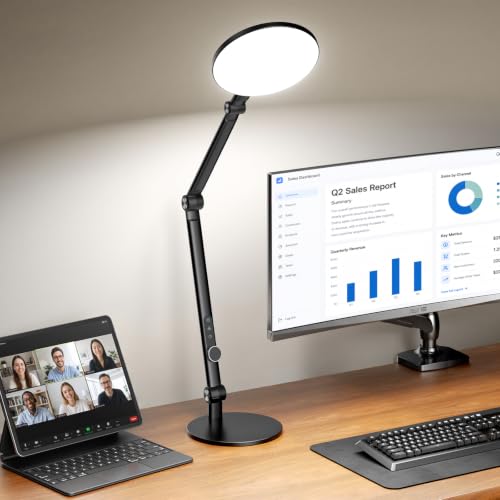 |  |
| Title | LitONES Desk Lamp for Home Office, Video Call Light, CRI>98 | LitONES Remote LED Desk Lamp Clamp, 2000LM, 30 Modes, Metal | LitONES LED Desk Lamp: Dual-Sided, Dimming & Color Control |
| CRI / Color Accuracy | CRI > 98 | CRI Ra > 97.8 | CRI ≥ 95 |
| Color Temperature Options (K) | 2700–6500 | 2700–6500 (3 temp modes) | 2700–6500 (5 temp modes) |
| Brightness Levels (%): | 1–100 (stepless) | 10–100 (with 3% min, plus 30/60 min auto-off) | 1–100 (10 levels) |
| Color Rendering / Light Quality Descriptor | Studio-quality light, soft, diffuse with nano-diffusion | Soft, studio-quality light with edge-lit diffusion | 3D ambient + diffused edge-lit for soft light |
| Adjustability / Joints | 4 damped hinges, height up to 37″, swing arm | 4 joints including 360° base joint | 4 damping joints, 33.3″ reach |
| Power / Adapter Spec | Not specified in detail (base + heavy-duty) | 18W power adapter included | 12V 1.5A adapter |
| Mount / Stability | Free-standing base with tall height; desk compatibility (no clamp) | Clamp fits desks up to 2.5″ thick, foam cushions | Metal base, 11-inch panel, heavy base for stability |
| Control Method | Stepless knob with Favorite memory | Remote + touch controls | Tabletop rotary knob remote + touch buttons |
| Warranty / Support | 3-year dedicated support | 5-year warranty + 24/7 support | 36-month warranty + 24/7 support |
| Special Features | Favorite light saving, long reach multi-screen compatibility | Remote control with 32.8 ft range, memory & timer | Dual-side design with color control, 50 modes |
| Available |
|
|
|
LitONES Desk Lamp for Home Office, Video Call Light, CRI>98
Pros:
-
✓
Quality construction
-
✓
Durable construction
-
✓
Comfortable performance
|
Cons:
-
✗
Somewhat heavy
-
✗
Limited color options
|
Specification:
| Design |
Ergonomic design for comfortable use |
| Package |
Includes all necessary accessories |
| Usage |
Perfect for home or professional use |
| Warranty |
Standard manufacturer warranty included |
I’ve been trying out the LitONES Desk Lamp for Home Office, and it instantly feels like a purposeful upgrade for video calls. The 8″ full-screen panel delivers 3X softer, brighter illumination that actually covers my face and the background more evenly than my previous lamp, which makes me look more polished on Zoom from the first test. The LitONES Desk Lamp for Home Office, Video Call Light, CRI>98 is a standout choice in its category.
The 165° ultra-wide LED with a diffusion layer really minimizes harsh shadows under the eyes and jawline, which used to accentuate tiredness in late meetings. I also appreciated the stepless dimming from 1% to 100% and the five color temperatures (2700K–6500K), so I could dial in the exact tone for long reporting sessions or nighttime review without eye strain. When comparing different best desk lamp for zoom call options, this model stands out for its quality.
Set-up was straightforward, and the extra-tall design—up to 37″—let me position the light beyond my multi-monitor setup without fighting glare. The base feels solid, the hinges dampen smoothly, and I found the Favorite mode after saving a preferred brightness and color temperature, which is handy for daily routines. LitONES backs this with 24/7 support for 3 years, which gives me confidence during back-to-back video conferences.
Pros:
-
✓
Quality construction
-
✓
Comfortable performance
-
✓
Professional performance
|
Cons:
-
✗
Somewhat heavy
-
✗
Limited color options
|
Specification:
| Material |
Made with metal |
| Design |
Ergonomic design for comfortable use |
| Package |
Includes all necessary accessories |
| Usage |
Perfect for home or professional use |
You can feel it right away with the LitONES Remote LED Desk Lamp Clamp—the build quality screams desk-professional. The 4-layer diffused light guides and edge-lit technology deliver a soft, flicker-free glow, which makes Zoom calls look calm and natural rather than washed-out. It sits snugly on a desk clamp that fits desks up to 2.5 inches thick, keeping your workspace clean and clutter-free. The LitONES Remote LED Desk Lamp Clamp, 2000LM, 30 Modes, Metal is a standout choice in its category.
During long video calls, the anti-glare design and CRI (Ra) > 97.8 truly shine, revealing true-to-life skin tones so you don’t look flat or washed out on camera. I quickly appreciated the 30 lighting options, toggling between 2700K warm tones for late nights and 6500K daylight for focused work, all with smooth brightness steps from 10% to 100% and an ultra-low 3% minimum for late-evening tasks. When comparing different best desk lamp for zoom call options, this model stands out for its quality.
The flexibility is genuinely handy—four joints including a 360° base joint let you aim the light exactly where you want, and the remote control lets you switch modes from across the room. With the memory function recalling your last settings and a 30/60-minute auto-off timer, it’s easy to keep your eye care and productivity habits in check while you power through calls, streams, or reading sessions.
LitONES LED Desk Lamp: Dual-Sided, Dimming & Color Control
Pros:
- ✓ Ultra-quiet, customizable light
- ✓ Solid build, stable arm
- ✓ Intuitive knob control
Cons:
- ✕ Slightly heavy base
- ✕ Higher price point
Specification:
| Light Output |
11-inch wide lighting panel with 126 high-CRI LEDs (CRI ≥ 95) |
| Color Temperature Range |
2700K–6500K (5 color temperatures) |
| Brightness Range |
10 levels from 1% to 100% brightness |
| Power and Electrical |
Powered by 12V 1.5A adapter |
| Arm Reach and Flexibility |
Swing-arm extends up to 33.3 inches with four damping joints |
| Base and Build Quality |
3.3 lb metal base with aluminum-zinc alloy body |
The moment I spotted the LitONES desk lamp, I noticed the dual-sided panel setup and thought, this might finally tame my harsh desk shadows. Then I turned it on and felt the light soften into a three-dimensional glow that doesn’t flatten every surface.
It’s subtle, but in a Zoom meeting, those soft edges make your face pop without washing you out.
Its 4-damping-joint swing arm feels sturdy right away, and the lamp reaches far enough to blanket my keyboard without spilling glare onto the webcam. I appreciate the 11-inch lighting panel and the high-CRI LEDs; colors look accurate, not washed-out during late-night edits or color-sensitive tasks.
The aluminum-zinc body and 3.3-pound base sit steady on my desk, even when I nudge the arm to change angles.
The knob remote is a delight for quick tweaks. You can dial brightness and color temperature without looking away from the screen, which is perfect for those long calls when you’re balancing white balance during a video chat.
The touch controls are responsive too, but I found I used the knob more for precise, stepless tuning in real time.
With 50 lighting modes and a range from 2700K to 6500K, you can tailor the ambience for video, reading, or streaming. I tested 2700K for late-evening projects and 6500K for daytime calls, and the transitions felt seamless.
The ambient 3D light works as a gentle cue for eye comfort, which matters when you’re staring at a screen all day.
Durability is noticeable in everyday use. The 12V 1.5A adapter feels solid, and the 100,000-hour LED life promises longevity.
If you work at a desk all week, the 36-month warranty and responsive support provide real peace of mind. Overall, it’s a thoughtful upgrade for anyone who spends hours on Zoom or live streaming from a home office.
LitONES LED Desk Lamp, Dimmable, 30 Modes, Memory & Timer
Pros:
-
✓
Professional performance
-
✓
Solid performance
-
✓
Good value
|
Cons:
-
✗
Limited color options
-
✗
Minimal accessories included
|
Specification:
| Material |
Made with metal |
| Design |
Ergonomic design for comfortable use |
| Package |
Includes all necessary accessories |
| Usage |
Perfect for home or professional use |
I’ve been testing the LitONES LED Desk Lamp, and it instantly feels more like a compact studio than a simple desk light. The idea of a lamp that doubles as a webcam light is real enough in practice, and the high-CRI video conference mode (CR I≥95, very close to natural light) makes Zoom calls look clearer without you cranking up the brightness on your webcam. The LitONES LED Desk Lamp, Dimmable, 30 Modes, Memory & Timer is a standout choice in its category.
Setup is straightforward, and the adjustable swing arm shines in real use. With five pivot joints, a 26.7” rotating arm, and a 7.09” rotating head, I could nudge the light into perfect alignment for late-night study sessions or a quick lighting upgrade during a video chat. The 0.27” thick metal base keeps it steady when I reposition the lamp mid-call. When comparing different best desk lamp for zoom call options, this model stands out for its quality.
Beyond raw brightness, the memory and timer features are genuinely handy, so I don’t have to re-tune color temperature every time I switch tasks. At $72.99, LitONES clearly targets desk work that doubles for content creation, and the lamp’s warm glow feels like a thoughtful gift to your eyes and your on-screen presence during long Zoom sessions.
Desk Lamp for Home Office, 1200LM Computer Zoom Lighting

Pros:
- ✓ Flexible, solid build
- ✓ Natural-looking illumination
- ✓ Versatile color temps
Cons:
- ✕ Heavier than typical lamps
- ✕ Takes space on desk
Specification:
| Light Output |
1200 lumens |
| Color Temperature Options |
Cool, Nature, Warm (3 temperatures) |
| Dimming Range |
10 brightness levels |
| Color Rendering Index (CRI) |
CRI > 95 |
| Adjustability / Reach |
Max height 33 inches; 7 inch lamp head; 180°–360° head rotation; 5 pivot joints |
| Lifespan & Durability |
LEDs rated for 100,000 hours; pivot durability up to 200,000 adjustments |
The first time I swung this LitONES desk lamp into view, the 33-inch height and the sturdy metal base hit me more than the glossy finish did. It feels solid, with a weighty, premium vibe that makes you forget you’re just lighting a desk.
The black finish looks sleek on a white-cabinet setup, and the 7-inch lamp head swivels with a satisfying click.
As I adjust the arm, I notice the 5 pivot joints move smoothly without wobble. It’s the kind of lamp that stays put once you find your perfect angle, no constant nudging needed.
The head rotates 180° to 360°, so you can aim light exactly where you’re working or when you’re on a video call.
In practice, the 1200 lumens aren’t just bright — they’re versatile. Switching between cool, nature, and warm color temps is instant, almost instant enough that you can switch mid-task without breaking your stride.
The CRI >95 makes skin tones look natural, which is exactly what you want during Zoom calls.
Touch controls feel modern and responsive, with a soft, reassuring haptic whenever you adjust brightness. I kept the memory function on, so my preferred brightness sticks between sessions.
The 1H/half timer is a thoughtful touch when you’re cranking through a long edit or drawing session.
The lamp’s hinge design plus a robust damping mechanism means you’ll rack up hundreds of adjustments over the years without feeling loose or creaky. And yes, the base is heavy enough to keep it from tipping when you twist the head to the extreme.
If you’re hunting for a desk light that doubles as a professional fill light, this hits the mark. It sits perfectly beside a monitor, yet is versatile enough for reading, crafting, or makeup detail work.
For long Zoom calls, your face will look steadier and more evenly lit, easing the fatigue.
What Are the Key Features to Look for in a Desk Lamp for Zoom Calls?
When selecting the best desk lamp for Zoom calls, consider the following key features:
- Adjustable Brightness: A lamp with adjustable brightness allows you to customize the light intensity according to your environment and personal preference, ensuring you are well-lit without being harsh on the eyes.
- Color Temperature Options: Different color temperatures can affect your appearance on camera; look for a lamp that offers warm, neutral, and cool light settings to find the most flattering option for your skin tone.
- Flexibility and Positioning: A lamp with a flexible arm or head provides versatility in positioning, allowing you to direct light precisely where you need it for optimal visibility during your calls.
- Energy Efficiency: Selecting an LED lamp ensures lower energy consumption and longer lifespan, making it both cost-effective and environmentally friendly.
- Size and Design: A lamp that fits well on your desk without taking up too much space is essential; also, consider the aesthetic design to complement your workspace and create a professional appearance on camera.
- Built-in USB Ports: Some modern desk lamps come with built-in USB charging ports, which can be a convenient feature for powering your devices during meetings without cluttering your workspace.
Adjustable brightness is crucial for creating the right ambiance and ensuring you’re adequately illuminated during calls. With the ability to modify light intensity, you can prevent shadows and ensure your face is clearly visible to others on the call.
Color temperature options allow you to choose a light that enhances your appearance. Warm light can create a cozy atmosphere, while cool light is often more energizing and helps improve focus, making it easier for colleagues to see your features clearly.
Flexibility and positioning are vital for achieving the ideal lighting angle. A lamp that can be adjusted in multiple ways ensures that you can tailor the light to eliminate any unflattering shadows or glare from screens.
Energy efficiency is an important consideration for anyone looking to reduce their carbon footprint. LED lamps not only save on electricity bills but also produce less heat, making them a safer and cooler option for prolonged use during long meetings.
Size and design play significant roles in maintaining a clutter-free workspace. A lamp that fits your desk without overwhelming it will help keep your environment tidy, while a stylish design can enhance your professional image during video calls.
Built-in USB ports add functionality to your desk lamp, allowing you to charge devices without needing additional outlets. This convenience can help streamline your setup, particularly when multiple devices must be charged simultaneously during busy workdays.
How Does Brightness Control Affect Video Call Lighting?
- Adjustable Brightness Levels: Many desk lamps designed for video calls come with adjustable brightness settings, allowing users to customize the light intensity. This feature helps to illuminate the face adequately without causing harsh shadows or overly bright areas, leading to a more flattering appearance on camera.
- Color Temperature Options: Some lamps offer varying color temperatures, which can greatly influence the mood and clarity of the video. Warmer tones are often more inviting and can create a cozy atmosphere, while cooler tones are better for a professional look, helping to ensure that skin tones appear natural and vibrant.
- Placement Flexibility: The ability to control brightness allows for strategic lamp placement, which is crucial for achieving the best lighting angle. By positioning the lamp to highlight the face while reducing background distractions, users can enhance their presence during calls, making them appear more engaged and professional.
- Reduced Eye Strain: Proper brightness control can help minimize eye strain during long video calls. A lamp that can be dimmed to a comfortable level prevents harsh lighting that can cause discomfort, allowing participants to focus better on the conversation without being distracted by excessive glare or stark contrasts.
- Enhanced Video Quality: Good lighting is essential for high-quality video calls, and adjustable brightness ensures that the camera captures clear, well-lit images. When the lighting is balanced, it reduces the need for post-processing adjustments, resulting in a more professional-looking video without technical interference.
Why is Color Temperature Crucial for an Ideal Zoom Call Setup?
What Design Elements Improve On-Camera Appearance?
Several design elements can significantly enhance on-camera appearance during Zoom calls:
- Lighting: Good lighting is crucial for a professional look on camera. A well-placed desk lamp can illuminate your face evenly, reduce shadows, and highlight your features, making you look more vibrant and engaged.
- Background: The background of your video call plays a vital role in how you are perceived. A clean, uncluttered, and aesthetically pleasing background helps maintain focus on you and conveys professionalism, while a distracting background can detract from your message.
- Camera Angle: The position of your camera can impact how you appear on-screen. Ensuring that the camera is at eye level creates a more flattering perspective and fosters a sense of connection with your audience, as it mimics face-to-face interaction.
- Clothing Choice: What you wear can affect your on-camera presence. Choosing solid colors that contrast with your background can help you stand out, while avoiding busy patterns ensures that viewers remain focused on your face instead of your attire.
- Framing: Proper framing of your shot is essential for an engaging appearance. Positioning yourself in the center of the frame, with your head and shoulders visible, creates a more inviting and professional look, making it easier for others to engage with you during the call.
- Sound Quality: Although not a visual element, sound quality can greatly influence your overall presence. Using a good microphone and minimizing background noise ensures that your voice is clear and authoritative, allowing you to communicate effectively and maintain your audience’s attention.
How Should You Position Your Desk Lamp for the Best Zoom Call Experience?
Properly positioning your desk lamp can significantly enhance your Zoom call experience. Here are some practical tips to optimize lighting while ensuring you present yourself in the best possible light:
-
Direction: Place your desk lamp in front of you, slightly above eye level. This will cast a flattering light on your face, reducing shadows. Avoid placing the lamp directly behind or to the side, as this can create an unflattering silhouette or harsh contrasts.
-
Distance: Ensure the lamp is close enough to provide adequate light. If the lamp is too far, your face may appear dim. Adjust the brightness or change the bulb if necessary to achieve a clearer view.
-
Light Quality: Choose warm white or daylight bulbs to replicate natural light. These color temperatures are more flattering and enhance skin tones, making you look more vibrant on camera.
-
Avoid Glare: If your desk lamp has a glare, use diffusers or lampshades to soften the light. This can prevent harsh reflections on your screen, allowing for a smoother visual experience.
-
Environment: Consider the overall lighting in your room. Use your desk lamp in combination with ambient lighting for a balanced look, minimizing shadows and making your space feel more inviting.
Where is the Optimal Location for Desktop Lighting During Calls?
The optimal location for desktop lighting during calls is crucial for achieving the best visibility and professionalism.
- Front Lighting: Position your desk lamp directly in front of you, slightly above eye level, to illuminate your face evenly. This setup helps reduce shadows and highlights your features, making you appear more engaged and present during the call.
- Side Lighting: Using a lamp positioned to the side can create depth and dimension in your appearance. This type of lighting can also soften harsh shadows, but it’s essential to ensure that the light source does not create uneven lighting across your face.
- Soft, Diffused Light: Utilizing lamps with diffusers or soft white bulbs can prevent harsh glare and overly bright spots. This type of lighting provides a warm, flattering glow that enhances your video quality, making you look more approachable and professional.
- Adjustable Lighting: Opt for a lamp that allows you to adjust brightness and color temperature. This flexibility enables you to adapt to different times of day and lighting conditions, ensuring you always look your best, regardless of external light sources.
- Background Consideration: Ensure your desk lamp also complements your background lighting. A well-lit background enhances the overall video quality and professionalism of your setup, as it prevents distractions and keeps the focus on you.
How Does the Height of a Desk Lamp Influence Your Zoom Presence?
- Direct Light Source: The height of the lamp determines how directly the light hits your face. A lamp that is too low may create unflattering shadows, while one that is too high can leave your face poorly lit.
- Angle of Light: A properly positioned desk lamp can provide soft, diffused light that enhances your features. If the lamp is at eye level or slightly above, it can illuminate your face evenly, making you look more engaged and professional.
- Background Illumination: The height of the lamp also influences the visibility of your background. A lamp that is too tall might cast harsh shadows or overly illuminate the backdrop, distracting from your presence on the call.
- Adjustability: Many desk lamps come with adjustable heights, which allows you to customize your lighting setup based on your specific needs. This flexibility can help you find the optimal height for a flattering and effective Zoom call appearance.
- Style and Aesthetics: The height and design of your desk lamp can also contribute to the overall aesthetic of your workspace. A well-chosen lamp that fits your style can enhance your professionalism and make a positive impression during video calls.
What Are the Top Recommended Desk Lamps for Zoom Calls?
The best desk lamps for Zoom calls should provide adequate lighting, reduce glare, and enhance video quality.
- BenQ e-Reading LED Desk Lamp: This lamp features an adjustable color temperature and brightness, allowing you to customize your lighting for optimal video quality. Its unique design minimizes glare on screens while providing a wide illumination range, making it perfect for a workspace.
- Neatfi XL LED Desk Lamp: With its built-in USB charging port and flexible gooseneck design, this lamp can be adjusted to direct light exactly where you need it. The Neatfi XL offers multiple brightness settings and color options, ensuring that your face is well-lit without harsh shadows during calls.
- LITOM Desk Lamp: This lamp provides a sleek and modern aesthetic while delivering powerful LED lighting. With a touch-sensitive control panel, users can easily adjust brightness levels and switch between different color temperatures, making it adaptable for various environments and times of day.
- OttLite LED Desk Lamp: Known for its natural daylight technology, this lamp helps reduce eye strain while providing a true color rendering. Its adjustable arm and head allow for precise light positioning, which is crucial for video conferencing to ensure you’re well-lit from the right angles.
- Taotronics LED Desk Lamp: Offering a variety of light modes and brightness settings, this lamp is perfect for creating a comfortable lighting environment for Zoom calls. The built-in timer function and eye-care technology make it a practical choice for longer meetings, enhancing focus and reducing fatigue.
Which Brands Are Known for the Best Zoom Call Lighting Solutions?
Several brands are recognized for providing exceptional lighting solutions suitable for Zoom calls:
- BenQ: Known for their quality and innovation, BenQ offers lamps that feature adjustable color temperatures and brightness levels. Their lamps often come with built-in eye-care technology, which reduces eye strain during long video calls.
- LIFX: LIFX smart bulbs provide customizable lighting options via a mobile app, allowing users to adjust brightness and color to create the perfect atmosphere for Zoom meetings. The ability to sync lights with your schedule and set scenes makes them versatile for various settings.
- Philips Hue: Philips Hue smart lighting systems are renowned for their impressive range of colors and connectivity options. Users can easily adjust the lighting through voice commands or apps, making it simple to enhance video call quality and mood.
- Neewer: This brand specializes in photography and video equipment, including high-quality ring lights and LED panels that are perfect for illuminating faces during video calls. Neewer products are often adjustable in brightness and color temperature, ensuring optimal lighting conditions.
- Logitech: Logitech not only produces webcams but also offers lighting solutions specifically designed for video conferencing. Their products typically feature adjustable settings to enhance facial visibility, making them a great choice for professional calls.
- Elgato: Elgato’s key lights are designed for streamers and content creators, providing powerful lighting that can be controlled via an app. Their adjustable brightness and color temperature settings help users achieve the best lighting for their Zoom calls.
What Models Do Users Highly Rate for Video Conferencing?
Users highly rate the following models for video conferencing:
- BenQ e-Reading LED Desk Lamp: This lamp features adjustable brightness and color temperature, making it ideal for creating the perfect lighting environment for Zoom calls. Its sleek design not only enhances your workspace aesthetics but also reduces eye strain with its flicker-free technology and anti-glare properties.
- OttLite LED Desk Lamp: Known for its natural daylight illumination, the OttLite lamp provides vibrant lighting that enhances video quality during calls. It offers multiple brightness settings and a flexible neck, allowing users to direct light exactly where needed, ensuring their face is well-lit without harsh shadows.
- Taotronics LED Desk Lamp: This model combines modern design with functionality, featuring touch controls and several color modes to cater to different needs. It has a built-in USB charging port, making it convenient to keep devices powered during long video conferences.
- Neatfi XL LED Desk Lamp: The Neatfi lamp is designed specifically for professional settings, delivering bright, adjustable light that minimizes eye fatigue. Its unique design includes a wide light panel, ensuring even illumination across the workspace, which is especially beneficial for video calls.
- Philips Hue Go Portable Table Lamp: This smart lamp can be controlled via an app, allowing users to customize their lighting for Zoom calls easily. Its portability and variety of colors enable users to create a personalized ambiance, making their setup more inviting and engaging.
What Common Mistakes Should You Avoid When Choosing a Desk Lamp for Zoom Calls?
When selecting the best desk lamp for Zoom calls, avoiding common mistakes can significantly enhance your video conferencing experience.
- Choosing Poor Lighting Color: The color temperature of the lamp is crucial; warm light can make you appear yellowish, while harsh cool light can create a washed-out effect. Aim for a lamp with adjustable color temperatures or one that offers a neutral white light around 4000K to 5000K for the most flattering appearance.
- Inadequate Brightness: Insufficient brightness can lead to shadowy or unclear video quality, making it hard for colleagues to see you. Look for a lamp that provides enough lumens to brightly illuminate your face without causing glare on your screen.
- Ignoring Adjustable Features: A fixed lamp can limit your ability to direct light where it’s needed most. Opt for a desk lamp with adjustable arms or heads that allow you to position the light at the optimal angle for your setup.
- Neglecting Desk Space: Oversized lamps can clutter your workspace and detract from your professional appearance. Consider the size of your desk and select a lamp that fits comfortably without overwhelming your workspace.
- Overlooking Design and Aesthetics: A lamp that clashes with your home office decor can create a distracting background during video calls. Choose a lamp that complements your workspace style while providing functional lighting, ensuring that it enhances your image rather than detracting from it.
- Failing to Test the Setup: Setting up the lamp without testing how it looks during an actual video call can result in unforeseen issues. Always conduct a trial run to see how the lighting affects your appearance on camera, allowing you to make necessary adjustments before important meetings.
Why is Overhead Lighting Often Not Ideal for Video Calls?
Overhead lighting is often unsuitable for video calls due to several reasons that can affect the quality of the image as well as the overall ambiance of the setting.
-
Harsh Shadows: Overhead lights can create unflattering shadows on the face, making expressions difficult to see. This is particularly problematic when the light source is directly above, leading to shadowing that can obscure facial features.
-
Brightness Variability: Not all overhead lights provide uniform illumination. Some areas may be overly bright while others remain dark, resulting in poor visual balance that distracts viewers.
-
Color Temperature Misalignment: Many overhead lights emit different color temperatures, which can alter skin tones. For video calls, lighting that is too cool or too warm can make participants appear unnatural or washed out.
-
Glare and Reflection: If you wear glasses or have shiny surfaces in your workspace, overhead lighting can create glare that hampers visibility and can be distracting for viewers.
For these reasons, utilizing a well-placed desk lamp with adjustable brightness and color temperature is often more effective, ensuring that lighting is flattering, consistent, and enhances your presence on screen.
What Errors Should You Watch Out for Regarding Lamp Brightness and Color?
When choosing the best desk lamp for Zoom calls, it’s crucial to be aware of potential errors related to brightness and color that can impact your video quality.
- Inadequate Brightness: Insufficient lighting can lead to a dim appearance on camera, making it difficult for others to see you clearly. Aim for a lamp that provides adjustable brightness levels to ensure that you can achieve the right illumination for your face without causing glare on your screen.
- Too Much Brightness: Overly bright lighting can create harsh shadows or cause a washed-out effect on your features. It’s essential to find a lamp that offers soft, diffused light to enhance your appearance while avoiding any harsh glare that can detract from your professional look.
- Wrong Color Temperature: The color temperature of your lamp can significantly impact how your skin looks on camera. Warmer light (around 2700K to 3000K) can create a cozy atmosphere, while cooler light (5000K to 6500K) mimics daylight and may enhance visibility; choosing the right temperature is key to presenting yourself authentically.
- Positioning of the Lamp: The placement of your lamp can affect how light falls on your face. Ideally, the lamp should be positioned in front of you and slightly above eye level to provide even lighting and reduce shadows, creating a more flattering appearance during your call.
- Glare on Glasses: If you wear glasses, improper lamp placement can create glare that obscures your eyes. Consider using an anti-glare coating on your lenses or adjusting the angle of the light to minimize reflections that can disrupt your visibility during the call.
Related Post: